Link Previews for Quarto
Hover previews for internal links on Quarto websites, in the style of Quartz digital gardens. When a reader rests the pointer on an internal link, a popover shows the target page’s title and content, enough to decide whether the jump is worth it.
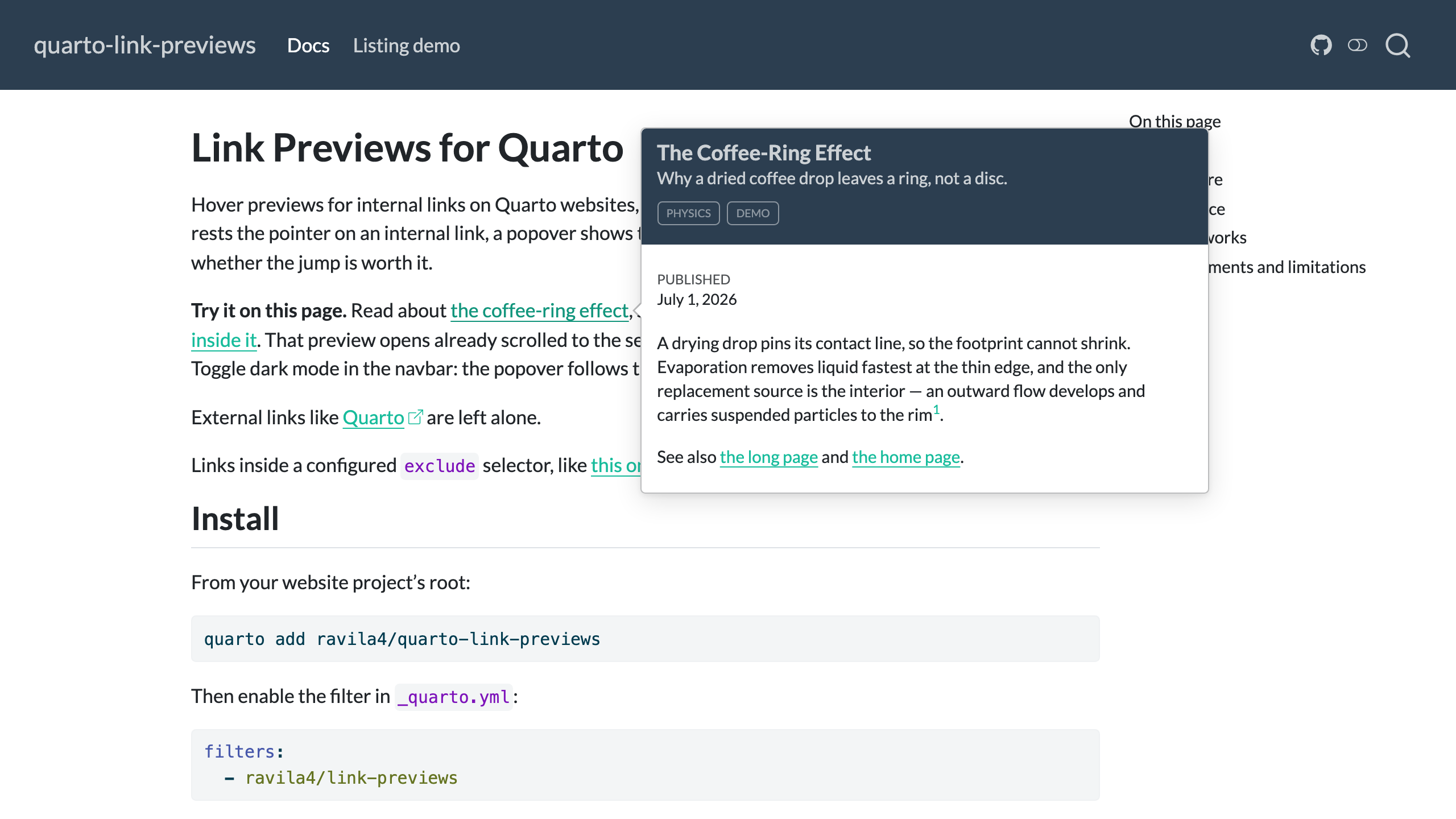
Try it on this page. Read about the coffee-ring effect, skim a long page, or jump straight to a section deep inside it. That preview opens already scrolled to the section. Sweep across the cards on the listing demo. Toggle dark mode in the navbar: the popover follows the theme.
External links like Quarto are left alone.
Links inside a configured exclude selector, like this one, are left alone too.
Install
From your website project’s root:
quarto add ravila4/quarto-link-previewsThen enable the filter in _quarto.yml:
filters:
  - ravila4/link-previews
That is the entire setup; the defaults below apply. A minimal example page shows the whole thing end to end. To make installs reproducible, pin a tag from the releases page: quarto add ravila4/quarto-link-previews@vX.Y.Z.
Configure
All keys are optional, set in _quarto.yml:
extensions:
  link-previews:
    content: "#title-block-header, #quarto-document-content"
    delay: [300, 0]     # show/hide delay in ms; a scalar sets show-delay only
    max-width: 500      # popover width in px
    placement: bottom-start   # or left/right/top/auto, each with -start/-end
    arrow: false        # true points an arrow at the link, speech-bubble style
    exclude:            # links matching these selectors never preview
      - ".sidebar-recent a"
A bare top-level link-previews: block, without the extensions: wrapper, works as well and predates the nested form. Both are read and their keys are combined, with the nested one winning a tie. Editors that read the extension’s schema, such as Quarto Wizard, complete and validate the nested spelling, so it is the better default for new projects.
The same block in a page’s front matter overrides the site settings for that page. It replaces the site block rather than merging into it key by key, so repeat any site-wide key you still want on that page. That is how Quarto merges document metadata into project metadata, not something this filter decides. The long page in the demo does this: it widens its own previews to 640px and restates the site’s exclude list to keep it.
With placement: right and arrow: true, the popover opens beside the link and points at it, speech-bubble style. When a side placement runs out of room, the popover tries the other alignment of that side, then the opposite side, then below or above the link, instead of clipping at the viewport edge. The coffee-ring page in the demo runs with both set, so its links show the side-placed, arrowed popover live.
Turning previews off
| Scope | How |
|---|---|
| One link | no-preview class or data-no-preview attribute on the anchor |
| A region | add a selector to exclude (how the paragraph above opts out) |
| One page | enabled: false under link-previews: in that page’s front matter |
| Whole site | enabled: false under link-previews: in _quarto.yml |
Styling
Popover colors come from Quarto’s own tippy theme, so previews track your site theme, light and dark, without configuration. Three custom properties tune the rest. Set them on :root in your site’s CSS:
:root {
  --link-preview-font-size: 1rem;          /* default 1em ≈ 14px */
  --link-preview-border-color: #8a8d8f;    /* default: 30% of the text color */
  --link-preview-shadow: none;             /* default: soft elevation shadow */
}
Reference
Options
| Key | Default | Meaning |
|---|---|---|
enabled |
true |
Kill switch, per page or site-wide |
content |
"#title-block-header, #quarto-document-content" |
Selectors extracted from the target page |
delay |
[300, 0] |
tippy show/hide delay in ms |
max-width |
500 |
Popover max width in px |
placement |
bottom-start |
Popover side: any tippy placement (top, bottom, left, right, auto, each with optional -start/-end); falls back toward bottom when out of room |
arrow |
false |
Point an arrow from the popover at the link |
exclude |
[] |
Extra CSS selectors whose links never get previews |
CSS custom properties
| Property | Default | Meaning |
|---|---|---|
--link-preview-font-size |
1em (≈ 14px) |
Preview text size |
--link-preview-border-color |
30% of the text color | Popover border color |
--link-preview-shadow |
soft elevation shadow | Popover box-shadow; none to remove |
What gets previewed
Same-origin links to other HTML pages of the site, including links from listing cards and grids. Links to another page’s #section open the preview scrolled to that section. Everything else is left alone: external links, navigation chrome (navbar, sidebar, TOC, pagination), footnotes and cross-references (Quarto’s own hovers keep those), lightbox image links, and downloads.
On default listing cards, which contain several anchors pointing at the same post, the preview binds once per card, so sweeping the mouse across a card does not flicker the popover.
Showing readers which links preview
A preview is a hover affordance, so a reader cannot see which links have one until they try. Quarto’s built-in link-external-icon covers this from the other side: external links get an arrow icon, which leaves the unmarked links as the ones that preview.
format:
  html:
    link-external-icon: true
This site runs with it on, which is why Quarto above carries an arrow and the links to the demo pages do not.
How it works
Quarto ships tippy.js on every HTML page for its footnote and cross-reference hovers. This extension reuses that bundle: on the first hover of an eligible link it fetches the target page, extracts the title block and article content, rewrites relative URLs, and shows the result in a popover themed like Quarto’s own. Fetches are cached, one per target page, so repeat hovers are instant. Everything happens against the rendered site at hover time, so a preview always shows the page as it currently stands.
Requirements and limitations
- Quarto ≥ 1.8.27 (the versions CI tests: 1.8.27 and current release).
- Hover is a pointer gesture: the extension is inactive on touch devices.
- Pages are previewed as static HTML: MathJax renders as source TeX, and script-driven figures (plotly, mermaid, OJS) appear empty.
- Links injected after page load (search dropdown, Shiny/OJS output) do not get previews.
- Absolute self-links (
https://your-site.com/...) count as external duringquarto previewon localhost; they preview correctly in production.
Source, issues, and changelog: github.com/ravila4/quarto-link-previews. MIT licensed.